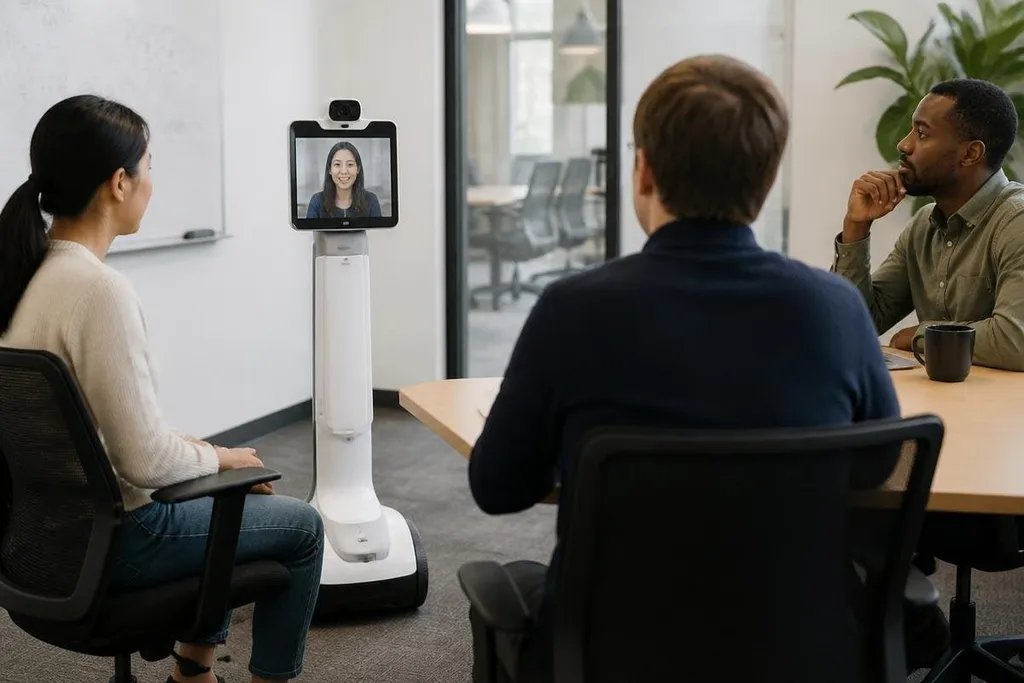
A telepresence robot gives a remote worker a camera, screen, microphone, speaker, and wheels in a place they can't reach. The useful change is physical presence: they can move toward a table, look at a person, and join a conversation from another location.
For a manager, engineer, or teacher comparing remote work tools, the question is practical: does a robot help people do work that a laptop call cannot?
- Remote workers can move through a shared space instead of staying inside one video window.
- A screen at the robot's head shows who is speaking and where they are looking.
- The hard limits are network delay, battery charging, access rules, and safe movement near people.
What the robot adds
A standard video call fixes the remote worker's view to one camera. With a telepresence robot, they can change that view by driving through the room, turning toward a speaker, and stopping beside a work area.
That movement matters during work that depends on location. A remote engineer could inspect a test bench through the robot's camera, while a site manager could join a floor meeting and speak to someone at a different table.
The robot doesn't perform the task itself. It gives the remote person a way to see and speak from the task area.
The control method is usually direct. The remote operator sends commands through a laptop or browser, and the robot sends back video and audio. A wide-angle camera can show more of the room, while a pan-and-tilt camera can let the operator look left, right, up, or down without moving the base.
Where it may help
The strongest fit is a site where people need frequent contact but cannot travel for every meeting. That may include an office, classroom, laboratory, clinic, or factory floor, though each setting has different rules for safety and privacy.
In a classroom, a remote student could move between group tables instead of watching one fixed feed. In a laboratory, a specialist could inspect an instrument while a local worker handles the physical setup. In an office, a remote employee could join a small discussion without asking everyone to carry a laptop around.
The value depends on how often location changes the conversation. If every meeting happens at a desk, a regular video call may cost less and do the job. I’d choose a telepresence robot only when moving through the space changes what the remote person can understand or decide.
A telepresence robot must support a remote person while moving through rooms shared with people who aren't controlling it. Reports on telepresence robot systems can tie that job to the robot's movement, camera position, and human handoff. The next limit is physical: wheels, doorways, stairs, and reach decide where the remote person can take part.
The limits are physical
Network delay can make driving feel slow or uncertain. A command sent from the operator may arrive after the robot has already moved a short distance, so the control system needs a clear video feed and a dependable stop command.
Battery life also sets a work limit. A robot that needs a charging stop during a long shift may leave the remote worker absent at the point they planned to attend. The buyer needs the maker's stated runtime, charging time, top speed, camera view, and total weight before comparing models.
Access creates a second set of limits. A robot may fail at a doorway, lift, ramp, narrow aisle, or floor transition. A person must also know when recording is active and who can view the video, especially in clinics, schools, and workplaces with private discussions.
Autonomy can reduce the burden of driving, but it changes the risk. When the robot moves on its own, it needs obstacle detection and a safe stop response. No source here supports a claim that any specific model can handle a particular building, so a live site test remains necessary.
A buying check for remote teams
Use this list before asking for a quote:
- Map the route: measure doors, ramps, lifts, floor changes, and the narrowest passage.
- Check the view: confirm whether the camera shows faces, hands, floor space, and the work area from the seated operator's screen.
- Time the shift: compare stated runtime with the hours the person must attend, then add time for charging.
- Test the link: run the robot on the actual network and check delay near walls, lifts, and busy equipment.
- Set privacy rules: define recording, access, storage, and the physical sign that shows when the camera is live.
- Name the local helper: assign someone to handle doors, cables, blocked routes, and tasks the robot cannot do.
A pilot should measure useful work, not minutes connected. Track how often the remote worker reaches the right place, how many stops need local assistance, and whether meetings end with decisions that a video call would have missed.
Telepresence robots won't replace every remote meeting. Their case is narrower and clearer: when seeing a place is part of the job, a movable camera and screen can give the remote worker a seat in that room. The open question for each site is whether that extra access saves enough travel and lost context to cover the robot's price and upkeep.